Showing posts with label menghapus. Show all posts
Showing posts with label menghapus. Show all posts
Thursday, January 19, 2017
Cara Menghapus Background gambar Foto Dengan Mudah Menggunakan Background Burner
Cara Menghapus Background gambar Foto Dengan Mudah Menggunakan Background Burner
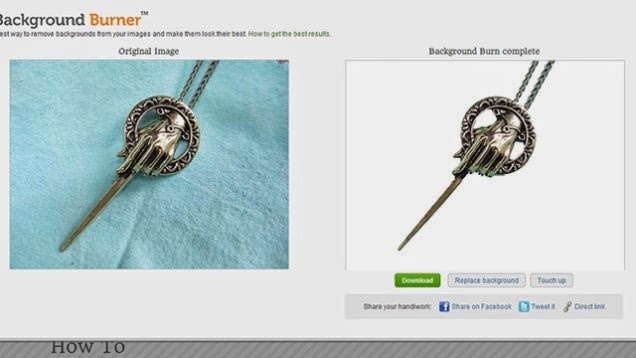
Bila Anda membutuhkan objek gambar, tetapi tidak dengan latar belakang, dapat menjadi hal yang sulit untuk memisahkannya, terutama jika Anda tidak memiliki Photoshop. Selama Anda tidak membutuhkan kontrol pixel-sempurna, aplikasi berbasis web yang bernama Background Burner, dapat melakukan pekerjaan tersebut hanya dalam beberapa klik, meski hasilnya agak sedikit kasar memang.
Aplikasi web ini dimulai dengan menganalisis foto dan kemudian menyajikan kepada Anda dengan beberapa pilihan untuk apa yang dianggapnya adalah bagian kanan gambar untuk menghapus. Anda kemudian dapat memberikan sentuhan dengan beberapa kuas, baik menyertakan atau mengecualikan bagian-bagian tertentu. Hasilnya tidak selalu sempurna, namun aplikasi ini cukup membantu dan dapat di andalkan.
Jika ingin mencobanya, silakan menuju ke Background Burner, upload foto yang akan diedit kemudian pilih bagian yang akan dihapus, lalu didownload foto yang telah di edit tadi.
Semoga bermanfaat........

Available link for download

Friday, December 9, 2016
Cara Menghapus Aplikasi Android Bawaan Bloatware Dengan Mudah
Cara Menghapus Aplikasi Android Bawaan Bloatware Dengan Mudah
Trick Mudah Menghapus Aplikasi Bawaan Di Android - Ngibadpunya - Aplikasi bawaan atau aplikasi yang sudah disediakan oleh vendor setiap brand ponsel memang ada beberapa yang tidak berguna dan tidak dibutuhkan. Daripada hanya menambah memory dan cukup menguras daya baterai lebih baik dihapus, tetapi dengan cara biasa aplikasi-aplikasi tersebut tidak dapat dihapus, lalu bagaimana caranya? Simak
Available link for download
Tuesday, November 22, 2016
Cara menghapus game demo yang terinstall pada Nokia asha 311
Cara menghapus game demo yang terinstall pada Nokia asha 311

- Use your computer to download the zip of demo games from here.
- Extract them to a new folder and then connect your phone and transfer this folder to your phone, either to the phone memory or the memory card.
- Pick up your phone, tap on files and browse to this folder that you just copied to the phone.
- When here, open the folder of the games which you want to remove and tap on them to install them onto your phone. Close them once they opens and move to the next game.
- After you’ve installed the duplicates of all the games you wanna remove, just return back to the Home Screen, scroll to the bottom and start removing these games you just installed. [To remove, you need to long tap the games icon and then click on the red cross (x) sign on its top right]
- You’ll notice that when you remove the game, it will still be visible there. What happens is that during your first attempt to remove, it will remove the pre-installed protected version and in the next attempt it will remove the duplicate which you installed.
- Repeat this for all the games which you wanna uninstall
- Restart you phone and look at the Home Screen now.
Did this guide work for you? Or you’re facing any problem? In any case, please leave in your comments below.
Available link for download
Subscribe to:
Posts (Atom)