Showing posts with label 2012. Show all posts
Showing posts with label 2012. Show all posts
Tuesday, December 20, 2016
Data tier application with SQL Server 2012
Data tier application with SQL Server 2012
Data-tier application in SQL Server defines the schema and objects that are required to support an application.It is really very simple.
There are two ways you can implement a DAC:
Here is how you extract using the SQL Server Management Studio in SQL Server 2012.
Connect to SQL Server on your computer. Here is the Object Explorer of a named instance of SQL Server 2012.
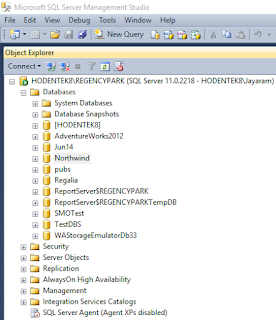
Dac_01
We now create a DAC using the Northwind database.
Right click Northwind to open the menu and the sub-menu as shown.
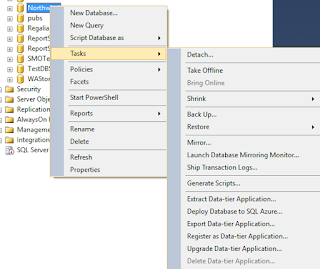
Dac_02
Click on Extract Data-Tier Application... to display the Introduction screen of the Wizard.
 Dac_03
The above screen pretty well describes the actions we take. It has the three steps:
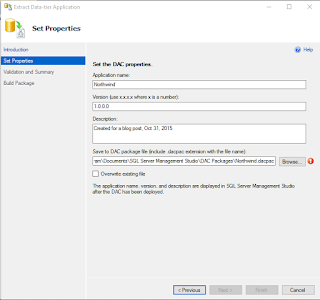
Dac_04
It appears that I have already created a file with that name and I will extract another with a different name NrthWnd.
 Dac_05
Click Next. Displays the validation and summary page of the wizard.
 Dac_07
Click Next. after a bit of creating and saving animation the process either succeeds or fails.
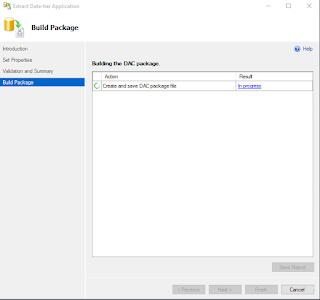 Dac_08
Click finish (after you get to see the Success of the operationb) and the DAC page is saved to the location indicated.
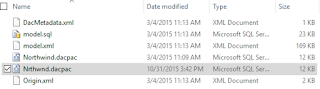
Dac_09
DAC files can be unpacked with programs shown.
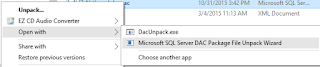 Dac_10
There are two ways you can implement a DAC:
- Using Microsoft Visual Studio 2010 with a SQL Server Data-tier application project type
- Using the extraction utility in SQL Servers Extract Data-tier wizard.
Here is how you extract using the SQL Server Management Studio in SQL Server 2012.
Connect to SQL Server on your computer. Here is the Object Explorer of a named instance of SQL Server 2012.
Dac_01
We now create a DAC using the Northwind database.
Right click Northwind to open the menu and the sub-menu as shown.
Dac_02
Click on Extract Data-Tier Application... to display the Introduction screen of the Wizard.
The above screen pretty well describes the actions we take. It has the three steps:
- Set the DAC properties
- Review object dependency and validation results
- Build the DAC Package
Dac_04
It appears that I have already created a file with that name and I will extract another with a different name NrthWnd.
Click Next. Displays the validation and summary page of the wizard.
Click Next. after a bit of creating and saving animation the process either succeeds or fails.
Click finish (after you get to see the Success of the operationb) and the DAC page is saved to the location indicated.
Dac_09
DAC files can be unpacked with programs shown.
Available link for download

Monday, November 14, 2016
Downlaod Game Naruto Mugen 2012
Downlaod Game Naruto Mugen 2012

Minimum System Requirements :
- Windows XP, Vista, or 7 (x86/x64)
- CPU that supports SSE2 (Intel Pentium 4 or AMD Athlon 64 or faster)
- GPU that supports Pixel Shader 2.0 (NVIDIA GeForce FX series or ATi Radeon R300 series or later)
- 1 GB RAM
Daftar beberapa kombinasi tombol untuk mengeluarkan jurus :
- START
- A + B / C / X / Y / Z
- B + A / C / X / Y / Z
- C + A / B / X / Y / Z
- X + A / B / C / Y / Z
- Y + A / B / C / X / Z
- Z + A / B / C / X / Z
- A/ B / C / X / Y / Z
- down + A / B / C / X / Y / Z
- up + A / B / C / X / Y / Z
- left + A / B / C / X / Y / Z
- right + A / B / C / X / Y / Z
- down,right, A / B / C / X / Y / Z
- down,left, A / B / C / X / Y / Z
- down + START
ScreenShot :


Catatan:
- Untuk jurus yg ditandai dengan koma harus cepat step menekannya
- Bila ada yang kombinasi tombol jurus diatas yang tidak berfungsi berarti harus ditekan beberapa detik agar jurusnya keluar, contoh rasengan kakashi: down + B tahan beberapa detik dan setelah itu rasengan akan keluar.
- Untuk mengeluarkan (special jutsu) kombinasikan tombol diatas, contoh hidan ritual: down,right,Z jangan dilepas dulu tombol Zlalu tekan B berulang kali, contoh susanoo sasuke EMS: down + A untuk menggunakan mangekyou sharingan dulu, setelah itu tekan Z.
- Untuk memudahkan mencoba kombinasi jutsu silahkan bermain di training mode
Link Download :
Download
Available link for download
Thursday, September 1, 2016
Download Game PES 2012 full version
Download Game PES 2012 full version

- Windows XP SP3, Vista SP2, 7
- Intel Pentium IV 2.4GHz or equivalent processor
- 1GB RAM
- DirectX 9.0c compatible video card. 128MB Pixel Shader 3.0 (NVIDIA GeForce 6600 or AMD ATI Radeon x1300 video card)
Screen shot :


Link Download :
Part 1
Part 2
Part 3
Part 4
Part 5
Part 6
Part 7
Part 8
Part 9
Part 10
Part 11
Part 12
Part 13
Part 14
jika diminta password, isi : pes2012
Available link for download
Subscribe to:
Posts (Atom)