Showing posts with label sql. Show all posts
Showing posts with label sql. Show all posts
Tuesday, December 20, 2016
Data tier application with SQL Server 2012
Data tier application with SQL Server 2012
Data-tier application in SQL Server defines the schema and objects that are required to support an application.It is really very simple.
There are two ways you can implement a DAC:
Here is how you extract using the SQL Server Management Studio in SQL Server 2012.
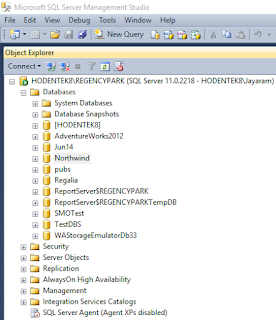
Connect to SQL Server on your computer. Here is the Object Explorer of a named instance of SQL Server 2012.
Dac_01
We now create a DAC using the Northwind database.
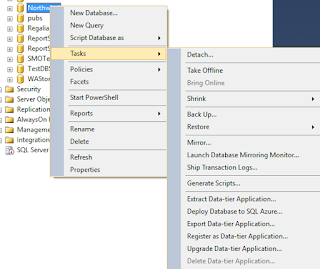
Right click Northwind to open the menu and the sub-menu as shown.
Dac_02
Click on Extract Data-Tier Application... to display the Introduction screen of the Wizard.
 Dac_03
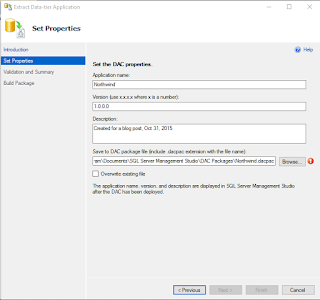
The above screen pretty well describes the actions we take. It has the three steps:
Dac_04
It appears that I have already created a file with that name and I will extract another with a different name NrthWnd.
 Dac_05
Click Next. Displays the validation and summary page of the wizard.
 Dac_07
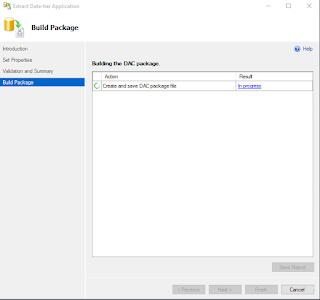
Click Next. after a bit of creating and saving animation the process either succeeds or fails.
 Dac_08
Click finish (after you get to see the Success of the operationb) and the DAC page is saved to the location indicated.
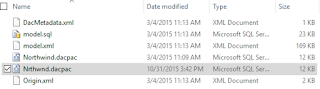
Dac_09
DAC files can be unpacked with programs shown.
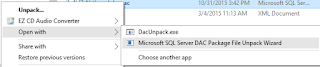 Dac_10
There are two ways you can implement a DAC:
- Using Microsoft Visual Studio 2010 with a SQL Server Data-tier application project type
- Using the extraction utility in SQL Servers Extract Data-tier wizard.
Here is how you extract using the SQL Server Management Studio in SQL Server 2012.
Connect to SQL Server on your computer. Here is the Object Explorer of a named instance of SQL Server 2012.
Dac_01
We now create a DAC using the Northwind database.
Right click Northwind to open the menu and the sub-menu as shown.
Dac_02
Click on Extract Data-Tier Application... to display the Introduction screen of the Wizard.
The above screen pretty well describes the actions we take. It has the three steps:
- Set the DAC properties
- Review object dependency and validation results
- Build the DAC Package
Dac_04
It appears that I have already created a file with that name and I will extract another with a different name NrthWnd.
Click Next. Displays the validation and summary page of the wizard.
Click Next. after a bit of creating and saving animation the process either succeeds or fails.
Click finish (after you get to see the Success of the operationb) and the DAC page is saved to the location indicated.
Dac_09
DAC files can be unpacked with programs shown.
Available link for download

Monday, October 17, 2016
Download SQL Server CTP 2 3 and check out enhancements
Download SQL Server CTP 2 3 and check out enhancements
SQL Server 2016 CTP 2.3 is available since September 2, 2015. Several features have been enhanced. Looks like integration of R Language with SQL Server 2016 is built-in.

The following are the stated enhancements in this preview:
These are additional enhancements besides the above:
Improvements to the SQL Server Integration Service, Query Execution, and DBCC CHECKDB.
Technical Datasheet is here (download PDF).
Download the evaluation edition here.
The following are the stated enhancements in this preview:
- Row Level Security support for in-memory OLTP tables
- A core engine scalability improvement, dynamically partitioning thread safe memory objects by NUMA or CPU, which enables higher scalability
- In-memory data warehouse (column store) performance optimizations
- Many-to-many derived hierarchies in Master Data Services
- Several performance improvements to SQL Server Analysis Services, including DAX query performance
- Enhancements to Reporting Services, including an updated Report Builder with a modern theme and report rendering for modern browsers
These are additional enhancements besides the above:
Improvements to the SQL Server Integration Service, Query Execution, and DBCC CHECKDB.
Technical Datasheet is here (download PDF).
Download the evaluation edition here.
Available link for download
Friday, October 14, 2016
devart ODBC for SQL Azure database
devart ODBC for SQL Azure database

Here are some quick facts about this driver;
Direct connection requiring just TCP / IP and there is no need for SQL Azure Client software. This mode of access implies better performance, reliability and improved deployment process. Packaging of your software lighter.

The current version supports many platforms, Windows, Linux, Mac OS X for both architectures 32bit and 64bit.
Common ODBC interfaces for Data Types and ODBC API functions are supported.
The author has not received any compensation from devart.
More info and download details here.
Besides this ODBC connection devart has many other products:

Available link for download
Subscribe to:
Posts (Atom)