Showing posts with label convert. Show all posts
Showing posts with label convert. Show all posts
Sunday, January 29, 2017
Convert MP3 Wav and Other Media Files into AAC or M4A Formats Using iTunes
Convert MP3 Wav and Other Media Files into AAC or M4A Formats Using iTunes
Convert MP3, Wav and Other Media Files into AAC or M4A Formats Using iTunes
1. First download iTunes if you dont have it:
2. Now install it and run the program. Well need to change a few options.
3. Click on "Edit -> Preferences".
4. Now go to "Advanced" tab and click on "Importing" tab.
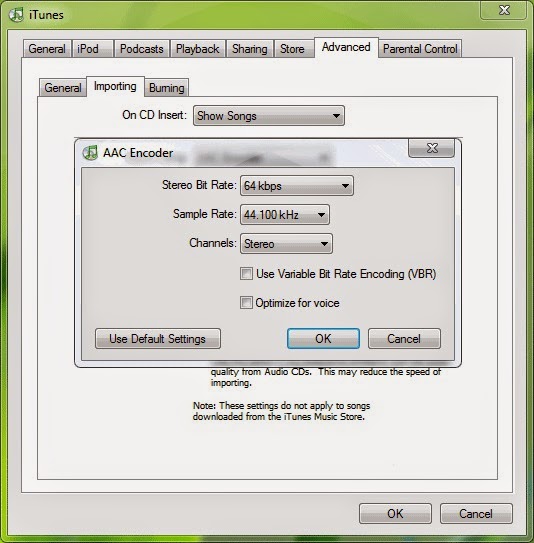
5. Select "AAC Encoder" from "Import Using" list and select "Custom" from "Setting" list. As soon as you select "Custom" option, itll show a new dialog box.
6. Select "64 kbps" as "Stereo Bit Rate", "44.100 kHz" as "Sample Rate" and "Stereo" as "Channels". These are standard values which I found best for a quality media file. You can change them according to your requirements.
.jpg)
7. Now click on OK and and again OK to exit the Preferences box.
8. Now we have customized all settings to convert files into AAC format. Now open any media file by pressing "Ctrl+O" or by selecting "File -> Add File to Library" option.
9. Itll add the file in Library window. Now right-click on the file and select "Convert Selection to AAC" option.
10. Thats it. Now sit back and wait for a few seconds. iTunes will convert the file into .M4A file which you can upload to your cell phone.
11. You can mass convert files into AAC. Open multiple files and select all of them and follow Step 9.
12. If you are wondering where is your converted file has been stored? Then go to "Edit -> Preferences" and click on "Advanced" tab.
It shows the folder location where iTunes will store the music files. You can change it using "Change" button.
-------------------------------------------------------------------------------------------------------------------
1. First download iTunes if you dont have it:
2. Now install it and run the program. Well need to change a few options.
3. Click on "Edit -> Preferences".
4. Now go to "Advanced" tab and click on "Importing" tab.
5. Select "AAC Encoder" from "Import Using" list and select "Custom" from "Setting" list. As soon as you select "Custom" option, itll show a new dialog box.
6. Select "64 kbps" as "Stereo Bit Rate", "44.100 kHz" as "Sample Rate" and "Stereo" as "Channels". These are standard values which I found best for a quality media file. You can change them according to your requirements.
7. Now click on OK and and again OK to exit the Preferences box.
8. Now we have customized all settings to convert files into AAC format. Now open any media file by pressing "Ctrl+O" or by selecting "File -> Add File to Library" option.
9. Itll add the file in Library window. Now right-click on the file and select "Convert Selection to AAC" option.
10. Thats it. Now sit back and wait for a few seconds. iTunes will convert the file into .M4A file which you can upload to your cell phone.
11. You can mass convert files into AAC. Open multiple files and select all of them and follow Step 9.
12. If you are wondering where is your converted file has been stored? Then go to "Edit -> Preferences" and click on "Advanced" tab.
It shows the folder location where iTunes will store the music files. You can change it using "Change" button.
-------------------------------------------------------------------------------------------------------------------
Not happy with your TV performance? Call at 0800 016 3909 (Freephone) to seek suggestions of TV calibration experts from Techvedic. We are not restrained by product make or model. And neither with the warranty period. Hence, feel free to get in touch with us to derive the best experience from your technology product.
About Techvedic: http://en.wikipedia.org/wiki/Techvedic
Get in touch with Techvedic on Social Media:
Techvedic Facebook Page: https://www.facebook.com/techvedic
Techvedic Twitter: https://twitter.com/techvedic
Techvedic Google Plus Page: https://plus.google.com/+TechvedicInc/posts
Techvedic YouTube:https://www.youtube.com/user/Techvedic
Techvedic LinkedIn Profile:https://www.linkedin.com/company/techvedic
Visit: Techvedic - Computer Tech Support Company | http://www.techvedic.co.uk/ | 0800 016 3909 (UK) | support@techvedic.com
Available link for download

Friday, November 4, 2016
Convert Your Documents To PDF Online Quickly For FREE
Convert Your Documents To PDF Online Quickly For FREE
There are various reasons for which we need to convert word documents to pdf. For instance, suppose you created a word file and used many different fonts and bullets to serve different purposes. Now you need to share it with you friends. You can mail it to them and they will have access to it. But, it may happen that their MS word version does not support those fonts or bullets or some special characters.
The most efficient way is to convert documents into pdf and send it to anyone.
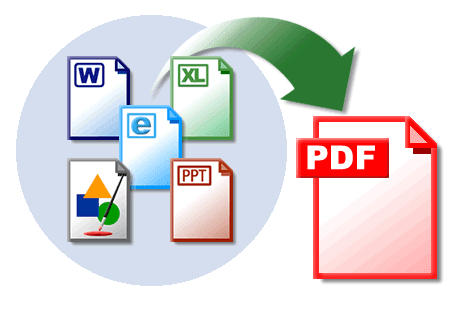
When our content is rich in images, links then too pdf files have relatively small size without any impact on the quality of content or images. Also, pdf files meet legal documents requirements. According to the court of law, any imaged electronic document must be in a format that cannot be altered or changed later without leaving an electronic footprint. Pdf files are more secure.
If you convert your document or excel files to pdf and then share it with your colleagues then it cannot be altered by anyone. The pdf software available to view pdf files are available for free. Adobe Acrobat Reader is the most popular pdf reader.
Okay, this solution is nice but how do you convert word files to pdf? Fortunately, there are many services and software available but many of them requires subscription or are too slow.
While I was recently trying to convert one of my word file to pdf, I found this online service called doc2pdf which not only made my job simpler and easier but also saved enough of time. I just thought sharing it with you so that you can also take advantage of their free service.
I got this service doc2pdf through Google and gave it a try. My experience was quite delightful. They have a very simple and easy to user interface.
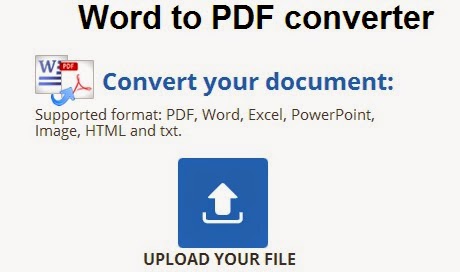
1. You will see a blue button with arrow asking you to upload your file. Upload any file on your system that you wish to convert and within seconds it will create a pdf file of your document file.
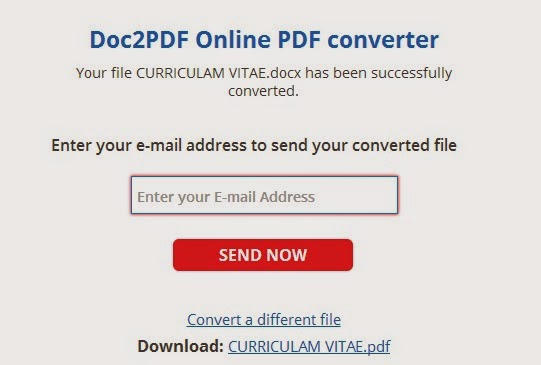
2. Now, as your conversion has been completed you can download the pdf file to your system or mail to your email id. As seen in the screenshot below. Just Enter your email address and they will send the converted file on your email ID. I got my job done for free.
Well, this was really quick. I have bookmarked this service because I frequently need to convert my files to pdf.
Though I used doc2pdf.com to convert word file to pdf but their service is not limited to this. You can convert even your Powerpoint to pdf or your Excel file to pdf file for free here.
Supported formats are : PDF, Word, Excel, PowerPoint, Image, HTML and txt.
I Hope This Article Helps You If You Getting Any Problem Related To This Article You Can Comment By Below Comment Box We Will Help You And If You Need Any Trick Or Software Or Hack You Can Mail Us We Will Try To Give That Article We Happy To Help You All Guys.Thank You Share And Subscribe Us. #Pankaj Patidar Rock

The most efficient way is to convert documents into pdf and send it to anyone.
What are the advantages of using PDFfiles?
These pdf files are specially good for forms and manuals. They give the same layout and view on all the devices. They are ideal when your document contains specialized fonts of music or foreign languages. Also, they can display high-resolution images in small file size.If you convert your document or excel files to pdf and then share it with your colleagues then it cannot be altered by anyone. The pdf software available to view pdf files are available for free. Adobe Acrobat Reader is the most popular pdf reader.
Okay, this solution is nice but how do you convert word files to pdf? Fortunately, there are many services and software available but many of them requires subscription or are too slow.
While I was recently trying to convert one of my word file to pdf, I found this online service called doc2pdf which not only made my job simpler and easier but also saved enough of time. I just thought sharing it with you so that you can also take advantage of their free service.
Convert Documents to PDF Online for Free
The main advantage of converting your documents to pdf online is that you don’t need to search for any software and download them on your system. These software may require subscriptions even.I got this service doc2pdf through Google and gave it a try. My experience was quite delightful. They have a very simple and easy to user interface.
2. Now, as your conversion has been completed you can download the pdf file to your system or mail to your email id. As seen in the screenshot below. Just Enter your email address and they will send the converted file on your email ID. I got my job done for free.
Though I used doc2pdf.com to convert word file to pdf but their service is not limited to this. You can convert even your Powerpoint to pdf or your Excel file to pdf file for free here.
Supported formats are : PDF, Word, Excel, PowerPoint, Image, HTML and txt.
I Hope This Article Helps You If You Getting Any Problem Related To This Article You Can Comment By Below Comment Box We Will Help You And If You Need Any Trick Or Software Or Hack You Can Mail Us We Will Try To Give That Article We Happy To Help You All Guys.Thank You Share And Subscribe Us. #Pankaj Patidar Rock
Dont Forget To Like And Follow..
Available link for download
Subscribe to:
Posts (Atom)